
Installing SMTPit Pro
You have now downloaded the Client plug-in archive, unzipped it, and are ready to install the plug-in. The Windows plug-in does also require Microsoft’s .Net Framework and a C++ Redistributable Package that you may need to install if your computer does not already them.
Install the plug-in file
- Close FileMaker Pro if it is open.
- Locate and open the folder you unzipped in the “Download the plug-in” section.
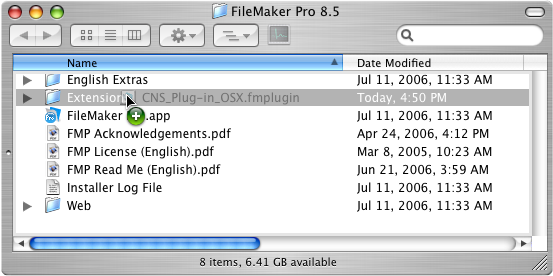
- Find the SMTPit_Pro_OSX.fmplugi plug-in file, and copy it. This is done by either right clicking on the file and selecting Copy, or by using the Edit menu and selecting the Copy option.
- Browse to the location on your hard drive where FileMaker is installed. By default, this is usually in the following location, but may vary:
HD/Applications/FileMaker Pro X/

*Where X is the version number of FileMaker - Find and open the “Extensions” folder which is located next to the FileMaker Pro application.
- Paste the plug-in file. This is done by either right clicking in an empty space and selecting Paste, or by using the Edit menu and selecting the Paste option.
- Open FileMaker Pro.
Microsoft’s .Net Framework v3.5.1
In order to use the Windows plug-in, you must have Microsoft’s .Net Framework version 3.5 service pack 1 (also known as 3.5.1) installed on your computer. If you do not have this already installed on your computer, you will need to install it. You may try opening FileMaker just to see if the plug-in appears in FileMaker Pro’s list of installed plug-ins. If the plug-in does not appear in the plug-in list, continue following these instructions. The chart below shows the default versions of .Net that are installed on the various versions of Windows.
| Default Installed .Net Versions | |
|---|---|
| Windows Version | Default .Net Version |
| Windows XP | Does not include .Net by default |
| Windows Server 2003 | v1.1 |
| Windows Server 2003 R2 | v2.0 |
| Windows Vista, Windows Server 2008 | v3.0 |
| Windows 7 | v3.5.1 |
| Windows 8/8.1, Windows Server 2012 | v4.5 |
| Windows 10 | v4.6 |
If you are unsure what versions of the .Net framework you have installed on your computer, Microsoft provides a webpage to help you determine which versions you have installed. You may also be able to go to the Control Panel in Windows, and then “Programs and Features” or “Add or Remove Programs” and see what versions you have installed. Note, this will only show versions you have installed and not the default version(s) that were included with Windows.
Install .Net 3.5.1
Windows Vista/Server 2008 or below - You can download it from Microsoft’s .Net Framework 3.5.1 page.
Windows 7 - The .NET Framework 3.5.1 is already installed by default.
Windows 8/8.1/10 - There is no download for the .NET Framework 3.5.1 as you can enable it in Window’s Control Panel. Follow the instructions provided on Microsoft’s website.
Windows Server 2012 - Please use the following instructions.
- Disable UAC
Windows Server 2012: Deactivating UAC - Reboot
- Install .NET 3.5.1. There are a couple ways to do this:
Enable .NET Framework 3.5 by using the Add Roles and Features Wizard
or
Deploy .NET Framework 3.5 by using Deployment Image Servicing and Management (DISM) - Re-enable UAC. Perform the instructions at the following link in reverse.
Windows Server 2012: Deactivating UAC - Reboot
If you have a newer version than .NET 3.5.1, the plug-in will still not appear in FileMaker. Unfortunately, because of the way .NET works with plug-ins, you must still have 3.5.1 installed even if you have a newer version installed. We are sorry for the inconvenience.